Do you need a website as a virtual assistant?
You can find clients without one, but a website makes almost every part of finding clients easier:
- Credibility. A professional page with your photo, services and work tells clients you're serious before you've even spoken.
- One link for everything. Proposals, LinkedIn, Upwork, your CV and your email signature can all point to the same place.
- You control the story. Platform profiles have limits and look the same as everyone else's. Your website is yours.
- Clients can find you. When a client searches your name after reading your proposal, a website is what they should find.
Website or portfolio: what most VAs really need
When people say “VA website”, they often picture a site with a home page, an about page, a services page, a blog and a contact page. For most virtual assistants, especially when you're starting out, that's more than you need.
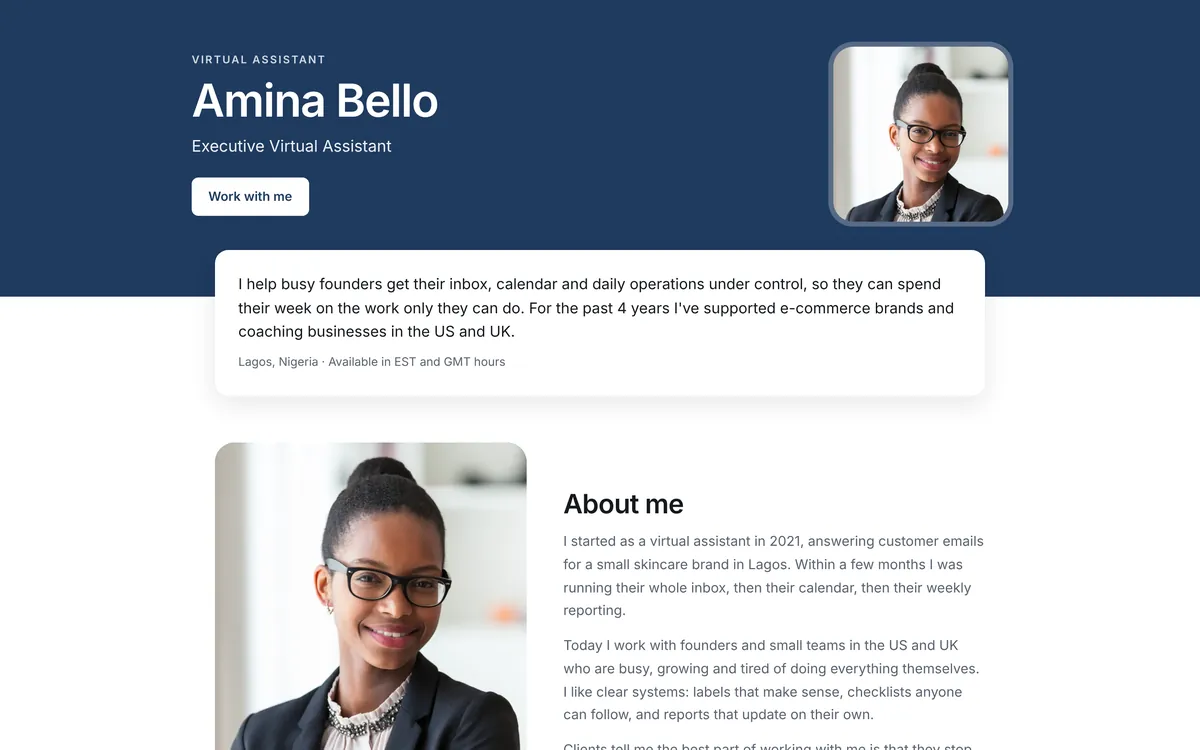
What clients actually want is a one-page portfolio website: everything on a single, well-organized page they can scroll through in a minute. It's faster to build, easier to keep up to date, and works better on phones.
A bigger multi-page website makes sense later, if you grow into an agency with a team, sell packages with detailed pages, or want to write a blog. Until then, a strong one-page site will do more for you than an unfinished five-page one.
What your virtual assistant website should include
Think of your page as a conversation with a busy client. Answer their questions in the order they ask them:
- Who are you, and can you help me? Your name, photo, title and a one-sentence headline about who you help and how.
- What exactly do you do? Your services, with a short, specific description of each.
- Can you prove it? Work samples with images and a few lines about each project.
- Do you know my tools? The software and platforms you use.
- Can I trust you? Testimonials, certifications and a short “About me” story.
- How do I hire you? A clear button to book a call, plus your email and social links.
A video introduction is a strong optional extra. Even a one-minute Loom or YouTube video lets clients hear your voice and see your confidence before they book.
What to write on your website
Your headline
Your headline matters more than any design choice. Use this formula:
I help [type of client] with [what you do] so they can [result they want].
For example: “I help e-commerce founders handle customer support and order management, so they can focus on growing their store.” It tells the right client, in one line, that they're in the right place.
Your services
Describe outcomes, not just tasks. Instead of “Calendar management”, write “I keep your calendar organized, schedule your meetings across time zones, and protect your focus time.”
Your work samples
For each sample, answer three questions in two or three sentences: what was the task, what did you do, and what changed? If you don't have client work yet, create sample projects and label them honestly. Here are sample project ideas for each VA service.
Your call to action
Tell clients exactly what to do next: “Book a free 15-minute call” works better than “Contact me”. Put the button at the top of the page and again at the bottom.
How to create your virtual assistant website for free
With VAPortfolio, the structure above is already built into every template, so you only need to add your content:
- Sign up at vaportfolio.com/signup and choose your username. It becomes your website address: vaportfolio.com/me/your-name.
- Choose a template from the 6 free designs, then pick your color and fonts.
- Add your content: your intro and photo, services, work samples, tools, certifications, testimonials and contact details. Changes save automatically.
- Add your booking link (Calendly, TidyCal, Google Calendar or similar) so clients can book a call from the button at the top of your page.
- Preview your website on desktop and phone, then publish it from your dashboard.
That's it: no hosting to set up, no plugins to update and nothing to install. For a detailed walkthrough with tips for each section, read how to create a virtual assistant portfolio for free.
Free vs paid: what a VA website really costs
A traditional website usually comes with several costs: a domain name each year, hosting or a website builder subscription, sometimes paid themes or plugins, and many hours of your time to design it and keep it updated.
A free VA portfolio website removes all of those. The main trade-off is your address: on VAPortfolio it's vaportfolio.com/me/your-name rather than your own domain. For most VAs finding clients, that's a good trade, because clients care about what's on the page much more than the address.
If you do need your own domain name, a blog or many pages, a general website builder on a paid plan is the right tool. We compare the options honestly in the best virtual assistant portfolio builders.
How to get your website found
- Share your link everywhere: proposals, LinkedIn (Featured section and contact info), Upwork and other platform profiles, your CV, your email signature and your social media bios.
- Use your real name in your username and on your page, so clients who search for you find it.
- Write a clear title and intro. Include what you do, like “Executive Virtual Assistant” or “Social Media Virtual Assistant”, so both clients and search engines understand your page.
- Keep it fresh. Add new samples and testimonials as you complete projects.
Published VAPortfolio pages are listed in our sitemap so search engines can find them. With Pro, you can also choose exactly how your page appears in Google results and when your link is shared on WhatsApp or LinkedIn.
Frequently asked questions
Can I create a virtual assistant website for free?
Yes. With VAPortfolio you can create and publish a one-page virtual assistant website for free, with no hosting, coding or design needed. You choose from 6 free templates and get your own link, like vaportfolio.com/me/your-name.
Do virtual assistants need a website?
It's one of the best ways to look established and make it easy for clients to say yes. A website gives clients one place to see your services, your work and how to book you, and gives you one link to put in every proposal and profile.
What should a virtual assistant website include?
A clear headline saying who you help and how, your photo, your services, work samples, the tools you use, testimonials or certifications, and an obvious way to contact you or book a call.
Can I use my own domain name for free?
Domain names (like yourname.com) are bought from a domain registrar, so they're never completely free. VAPortfolio gives you a free link at vaportfolio.com/me/your-name. If you need your own domain, you'll need a paid plan on a general website builder.
How long does it take to make a VA website?
With a builder made for virtual assistants, the setup takes minutes. Writing your intro and service descriptions and preparing work samples takes longer: plan for an afternoon if you're starting from scratch.
Will my virtual assistant website show up on Google?
Published VAPortfolio pages are included in our sitemap, so search engines can find and index them. Ranking for your name is the realistic goal. Sharing your link on LinkedIn and other profiles helps search engines discover it faster.